Aceste aplicatii sunt utilizate in terminal, iar instalarea lor s-a facut pe sistemul Fedora 24.
13. cat
Permite crearea de file, vizualizarea continutului, concatenarea filelor si redirectarea acestora catre terminal sau fisiere.
Sintaxa:
cat [OPTIONS] [FILE] ...
Utilizare:
cat /etc/passwd -afisarea continutului unei file
12. lp
submits files for printing, or alters a pending print job. Use a file name of "-" to specify printing from the standard input.
Utilizare:
lp file.pdf -printeaza fila.pdf in ton de gri
lp -o ColorModel=color file.pdf -printeaza color
11. lpr
Trimite fisiere la imprimanta pentru a fi printate.
Utilizare:
lpr myfile.txt -printeaza fila myfile.txt
cat myfile.txt | lpr -citeste din standard input si trimite la copire fisierul
lpr -#3 myfile. txt - 3 copii ale fisierului
10. git
Git is a free and open source distributed version control system designed to handle everything from small to very large projects with speed and efficiency.
9. top
The top command is the traditional way to view your system’s resource usage and see the processes that are taking up the most system resources. Top displays a list of processes, with the ones using the most CPU at the top.

8. enscript
7. grep
grep este o comandă UNIX pentru căutare de text. Denumirea vine de la primele litere ale „global/regular expression/print”, ce reprezintă o serie de comenzi pentru editoare de text precum ed. Comanda "grep" caută în fișiere sau în intrarea standard liniile care corespund unei expresii regulate date și le scrie către ieșirea standard.
Utilizare:
grep apple fruitlist.txt
6. ffmpeg
FFmpeg is the leading multimedia framework, able to decode, encode, transcode, mux, demux, stream, filter and play pretty much anything that humans and machines have created.
Instalare:
sudo dnf install ffmpeg
5. wget
GNU Wget is a free utility for non-interactive download of files from the Web. It supports HTTP, HTTPS, and FTP protocols, as well as retrieval through HTTP proxies.
Instalare:
sudo dnf install wget
Utilizare:
wget http://www.bankofengland.co.uk/publications/Documents/inflationreport/2017/may.pdf
4. links
Web browser.
Instalare:
sudo dnf install links
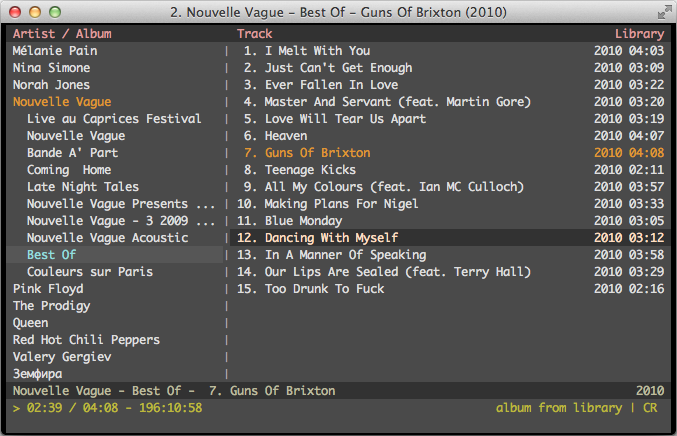
3. cmus
is a small, fast and powerful console music player for Unix-like operating systems.
Instalare:
sudo dnf install cmus
2. newsbeuter
Newsbeuter is an open-source RSS/Atom feed reader for text terminals. It runs on Linux, FreeBSD, Mac OS X and other Unix-like operating systems. Newsbeuter's great configurability and vast number of features make it a perfect choice for people that need a slick and fast feed reader that can be completely controlled via keyboard.
Instalare:
sudo dnf install newsbeuter
13. cat
Permite crearea de file, vizualizarea continutului, concatenarea filelor si redirectarea acestora catre terminal sau fisiere.
Sintaxa:
cat [OPTIONS] [FILE] ...
Utilizare:
cat /etc/passwd -afisarea continutului unei file
12. lp
submits files for printing, or alters a pending print job. Use a file name of "-" to specify printing from the standard input.
Utilizare:
lp file.pdf -printeaza fila.pdf in ton de gri
lp -o ColorModel=color file.pdf -printeaza color
11. lpr
Trimite fisiere la imprimanta pentru a fi printate.
Utilizare:
lpr myfile.txt -printeaza fila myfile.txt
cat myfile.txt | lpr -citeste din standard input si trimite la copire fisierul
lpr -#3 myfile. txt - 3 copii ale fisierului
10. git
Git is a free and open source distributed version control system designed to handle everything from small to very large projects with speed and efficiency.
9. top
The top command is the traditional way to view your system’s resource usage and see the processes that are taking up the most system resources. Top displays a list of processes, with the ones using the most CPU at the top.
8. enscript
Enscript  converts  text  files  to  PostScript  and  spools  generated
       PostScript output to the specified printer or leaves it to file.  If no
       input files are given, enscript processes standard input.  Enscript can
       be extended to handle different output media and it  has  many  options
       which can be used to customize printouts.
7. grep
grep este o comandă UNIX pentru căutare de text. Denumirea vine de la primele litere ale „global/regular expression/print”, ce reprezintă o serie de comenzi pentru editoare de text precum ed. Comanda "grep" caută în fișiere sau în intrarea standard liniile care corespund unei expresii regulate date și le scrie către ieșirea standard.
Utilizare:
grep apple fruitlist.txt
6. ffmpeg
FFmpeg is the leading multimedia framework, able to decode, encode, transcode, mux, demux, stream, filter and play pretty much anything that humans and machines have created.
Instalare:
sudo dnf install ffmpeg
5. wget
GNU Wget is a free utility for non-interactive download of files from the Web. It supports HTTP, HTTPS, and FTP protocols, as well as retrieval through HTTP proxies.
Instalare:
sudo dnf install wget
Utilizare:
wget http://www.bankofengland.co.uk/publications/Documents/inflationreport/2017/may.pdf
4. links
Web browser.
Instalare:
sudo dnf install links
3. cmus
is a small, fast and powerful console music player for Unix-like operating systems.
Instalare:
sudo dnf install cmus
2. newsbeuter
Newsbeuter is an open-source RSS/Atom feed reader for text terminals. It runs on Linux, FreeBSD, Mac OS X and other Unix-like operating systems. Newsbeuter's great configurability and vast number of features make it a perfect choice for people that need a slick and fast feed reader that can be completely controlled via keyboard.
Instalare:
sudo dnf install newsbeuter
1. abook
Este o agenda telefonica in terminal.
Instalare:
sudo dnf install abook
Utilizare:
man abook >afiseaza manualul aplicatiei
abook -h >afiseaza meniul help al aplicatiei
Este o agenda telefonica in terminal.
Instalare:
sudo dnf install abook
Utilizare:
man abook >afiseaza manualul aplicatiei
abook -h >afiseaza meniul help al aplicatiei


Niciun comentariu:
Trimiteți un comentariu